You spec the access points, the team runs the cable, and then someone asks why the coverage drops off past the second corridor — or why the warehouse RF environment is a mess of dead zones no amount of AP repositioning seems to fix. Nine times out of ten the answer traces back to a decision that felt trivial at the time: what the signal is actually riding on between the source and the antenna. Get that wrong and you’re looking at retransmissions, latency spikes, and in a production environment, dropped connections to machine controllers or inventory scanners that translate directly into line stoppages and rework.
WiFi does not require coaxial cable to function. A standard wireless router or access point connects to the network over Ethernet (typically Cat 5e, Cat 6, or Cat 6A twisted-pair) and transmits the RF signal through its internal or attached antenna — no coax involved. Coaxial cable becomes relevant only when an external or remote antenna must be connected to an access point or when distributing cable TV or DOCSIS broadband signals that feed a modem upstream of the router.
What makes this worth a closer look is that “no coax required” is not the same as “the cable infrastructure doesn’t matter.” The backhaul wiring, the antenna feedline where it exists, and the medium carrying signal to each AP all shape what WiFi actually delivers at the client — and the tradeoffs between coax, structured Ethernet, and fiber are less obvious than most install guides suggest.
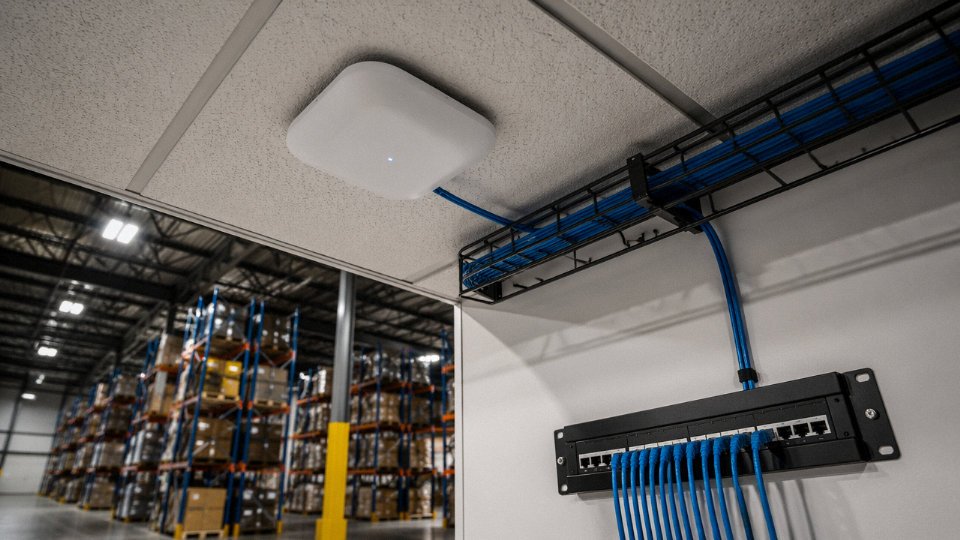
How Coaxial Cable Has Traditionally Delivered the Internet Signal That Feeds WiFi Routers
Most people think of coax as the thick, slightly annoying cable their ISP technician stapled along the baseboard in 2009 and never came back to tidy up. That’s fair. But understanding what it actually does — and how well it does it — matters before you decide whether to rip it out or repurpose it.
DOCSIS and How Coax Carries Broadband RF
The cable broadband system most homes and commercial buildings in North America, parts of Europe, and large portions of Latin America rely on runs on a standard called DOCSIS — Data Over Cable Service Interface Specification. The coaxial cable in this system isn’t just a dumb pipe. It’s carrying modulated RF signals across a defined frequency plan, and the version of DOCSIS determines how much of that spectrum gets used.
DOCSIS 3.0, still the dominant deployed version in many markets, uses downstream frequencies roughly from 54 MHz up to around 860 MHz, channel-bonding multiple 6 MHz (or 8 MHz in EuroDOCSIS) carriers to reach aggregate downstream speeds in the 300–1,000 Mbps range depending on how many channels the operator bonds and how loaded the node is. DOCSIS 3.1 pushed the downstream ceiling to 1.2 GHz using OFDM (Orthogonal Frequency Division Multiplexing) channels up to 192 MHz wide, enabling single-modem downstream throughput in the 1–2.5 Gbps range under real plant conditions — though what you actually see depends heavily on headend configuration and neighborhood utilization. DOCSIS 4.0, which is in early rollout as of this writing, extends the upstream spectrum dramatically and targets symmetrical multi-gigabit service, but it runs over the same physical coaxial infrastructure as 3.1. That’s the point: the cable doesn’t change. The electronics on each end do.
Why Coax Handles RF Well Enough to Matter
The physical characteristics of CATV coaxial cable are genuinely well-matched to broadband RF distribution. The 75-ohm impedance standard used throughout cable television and DOCSIS infrastructure is a deliberate choice — it represents roughly the optimal compromise between power-handling capacity and low signal attenuation for this frequency range. The center conductor, solid dielectric, and braided or foil shield (or both, in quad-shield RG-6) work together to contain the RF field inside the cable rather than radiating it or letting external interference in.
Attenuation still accumulates with distance and frequency. RG-6 quad-shield — the de facto standard for residential and light commercial DOCSIS drops — runs roughly 6–8 dB per 100 feet at 1 GHz, a figure that climbs as frequency rises. Heavier RG-11, sometimes used for longer service drops from the street pedestal or in commercial risers, brings that down to somewhere in the 3.5–4.5 dB per 100 feet range at the same frequency. In practice, DOCSIS installers aim to keep the run from the last splitter to the modem under 150 feet without amplification — beyond that, signal-to-noise margin starts degrading and modem retrains or uncorrectable errors follow. Every passive splitter you insert costs you signal: a two-way split loses roughly 3.5 dB, a four-way around 7 dB. Stack three or four splitters on a residential distribution and you can easily explain why someone’s modem connects at a lower DOCSIS channel count than it should.
Each passive splitter in a DOCSIS coax run causes measurable SNR degradation that can reduce modem channel bonding capacity and effective throughput.True
Passive splitters introduce insertion loss of 3.5–7 dB depending on configuration. Lower received power reduces SNR at the modem, which the DOCSIS protocol responds to by dropping bonded channels or increasing error correction overhead, both of which reduce usable throughput.
MoCA: Reusing What’s Already in the Wall
Here’s where the conversation gets practically useful for retrofit situations. MoCA — Multimedia over Coax Alliance — technology uses the same coaxial cable already installed in a building, but overlays a separate data signal in a higher frequency band (roughly 500 MHz to 1.5 GHz depending on MoCA version) that doesn’t interfere with the DOCSIS downstream. MoCA 2.5, the current mainstream version, supports link speeds up to 2.5 Gbps between adapters, with real-world throughput typically landing in the 800–1,500 Mbps range depending on cable quality and the number of active nodes. That’s more than adequate to backhaul a WiFi 6 access point without laying new Ethernet.
In a typical scenario — a two-story home or a small office suite where someone needs a wired-backhaul mesh WiFi node in a back room — MoCA adapters on the existing coax runs can deliver Ethernet to that node without touching the walls. The cost is roughly the adapters themselves plus a POE injector or a switch port; the disruption is near zero. For a facility manager doing a quick WiFi upgrade on a tight timeline, that matters.
The installed base argument is blunt but real: hundreds of millions of premises globally already have coaxial cable runs in serviceable condition. Dismissing coax as obsolete ignores the practical economics of infrastructure that’s already paid for and still functional. Whether that coax stays in the signal path, gets repurposed via MoCA, or genuinely gets bypassed in favor of fiber-to-the-router — that’s what the rest of this article works through.
Five Proven Pathways to Full WiFi Operation With Zero Coaxial Cable
Not every building has a coax drop, and plenty of sites that do have one are better served by replacing it entirely. The five options below cover the full spectrum — from fiber pulling to cellular CPE to structured copper — with enough operational detail to inform a real procurement or design decision.
Pathway 1 — Fiber to the Premises (FTTP/FTTH)
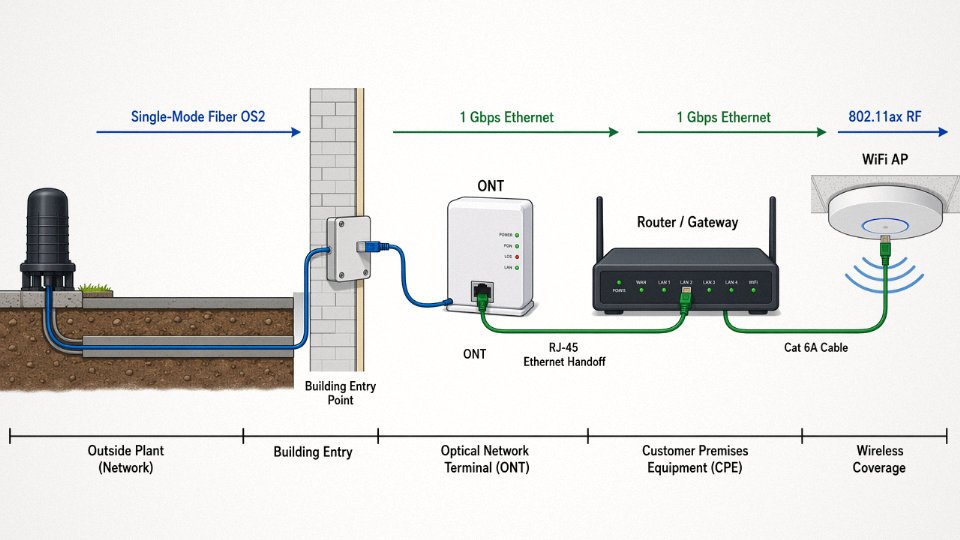
This is the cleanest architecture available. The carrier terminates single-mode fiber at an ONT (Optical Network Terminal), which outputs a standard Ethernet handoff — typically a single RJ-45 at 1 Gbps symmetric for residential service, or 10 Gbps on enterprise-grade GPON/XGS-PON circuits. No coax touches the signal path at any point.
Single-mode fiber (SMF, OS2) is what ISPs run in the ground; it supports tens of kilometers without amplification. Inside a building, you might encounter multimode (OM3/OM4) for short horizontal runs, but the ONT-to-router link is usually just a 1–3 meter factory-made patch cord. Latency from ONT to router is effectively zero — sub-millisecond. If your site can get FTTP provisioned, there is almost no reason to argue for coax.
Pathway 2 — DSL Over Telephone Twisted-Pair
VDSL2 (profile 35b) can deliver 300–500 Mbps aggregate over loops shorter than roughly 250 meters from the DSLAM. G.fast pushes theoretical peaks toward 1 Gbps but degrades sharply — sometimes catastrophically — past 100–150 meters. The modem outputs Ethernet to the router, so the internal architecture is identical to fiber from the router inward.
The operational warning here is real: loop length is everything. A site 400 meters from the street cabinet on aging 0.4 mm pair will see a fraction of the rated speed, sometimes under 50 Mbps. Before specifying DSL as a coax replacement, get the loop length from the carrier — not an estimate, the actual measured distance.
VDSL2 and G.fast modems output standard Ethernet to the connected router, with no coaxial cable required anywhere in the premises wiring path.True
Both VDSL2 and G.fast are xDSL technologies delivered over telephone-grade twisted pair; the customer-premises modem/gateway converts the DSL signal to Ethernet (typically 100BASE-T or Gigabit Ethernet) for handoff to the router, completely bypassing coaxial cable infrastructure.
Pathway 3 — Fixed Wireless Access (4G/5G FWA)
An outdoor CPE (customer premises equipment) unit mounts on a rooftop or window, locks onto the nearest cell sector, and converts the cellular signal to Ethernet or a local WiFi broadcast fed into your router’s WAN port. No copper, no coax, no trench.
Median real-world 5G FWA downloads in dense suburban US deployments ran roughly 200–400 Mbps through 2024, though mmWave installations in line-of-sight conditions have hit 800 Mbps or more. Performance varies significantly with tower distance, obstruction, and — something people underestimate — time of day. A site that tests beautifully at 10 a.m. may throttle under congestion at 7 p.m.
Pathway 4 — Ethernet Structured Cabling Backbone
Cat 6A (10GBASE-T, 100 m at ≤20.9 dB insertion loss per TIA-568-C.2) is the gold standard for enterprise WiFi backhaul and for any facility where you need predictable, interference-immune throughput. Run it from the ISP demarcation to the router, then from the router to ceiling-mount access points. Cat 8 (40 Gbps at 30 m) is worth considering for switch-to-core uplinks but is overkill for most access-point drops.
This pathway costs more upfront — materials plus skilled installation labor — but delivers the lowest latency, highest reliability, and zero spectral interference. In practice it’s what I’d specify for any manufacturing floor, warehouse, or hospital where WiFi coverage needs to be dense and the RF environment is already chaotic.
Pathway 5 — Wireless Mesh With Dedicated Backhaul Radio
Tri-band mesh systems (and WiFi 6E/7 platforms using the 6 GHz band as an exclusive backhaul channel) eliminate physical cabling between access points entirely. Each hop adds roughly 2–5 ms of latency, which is imperceptible for most applications but can matter for real-time control or video conferencing chains with three or more hops.
The practical limit is spectrum congestion. In a dense apartment block or a factory with heavy RF noise from VFDs and welding equipment, the backhaul radio will compete for airtime and performance will be uneven. Mesh works well in residential deployments and small open-plan offices; it is not a substitute for Ethernet backhaul in high-density enterprise environments.
Comparing the Five Pathways
| Pathway | Installation Complexity | Indicative Cost per 100 m Equivalent | Max Realistic Throughput | Typical Latency (ISP to router) | Interference Susceptibility |
|---|---|---|---|---|---|
| FTTP/FTTH | Low (ONT already installed) | $0–$15 (patch cord only) | 1–10 Gbps depending on tier | <1 ms | Essentially none |
| DSL/VDSL2/G.fast | Low–Medium | $0–$30 (modem only) | 50–500 Mbps (loop-length dependent) | 5–20 ms | Low (electrical noise on old pair) |
| 5G/4G FWA | Low–Medium (CPE mount) | $100–$400 (CPE hardware, one-time) | 50–800 Mbps (varies by site) | 10–40 ms | Moderate–High (congestion, obstruction) |
| Cat 6A Ethernet | High (physical cable pull) | $8–$25/m installed (labor + material) | 10 Gbps at ≤100 m | <0.1 ms | None |
| Wireless mesh backhaul | Very Low | $200–$600 per node (hardware) | 600–2,400 Mbps (per vendor claims, real-world lower) | 5–20 ms per hop | Moderate–High (RF environment) |
Costs depend heavily on building construction type, regional labor rates, and whether conduit already exists. The throughput figures assume reasonably modern hardware and non-degraded media; actual performance will vary.
Ethernet Cabling as the Superior Backhaul for Enterprise and Industrial WiFi Without Coax
Walk onto any commercial network installation post-2015 and you’ll notice something quickly: enterprise access points don’t have F-connectors. The Cisco Catalyst 9130, the Aruba 635, the Ubiquiti UniFi U7 Pro — every one of them ships with a single RJ-45 port on the back. That’s not an oversight. It reflects a deliberate platform decision by every major AP vendor: Power over Ethernet is the native interface, and structured copper cabling is the assumed backhaul. Coax was never part of the design intent for these devices, and retrofitting around that fact costs money and introduces failure points that a clean Cat 6A installation simply doesn’t have.
PoE Consolidates Power and Data Into One Cable Run
The IEEE 802.3 PoE family is worth understanding in practical terms, not just spec-sheet terms. The original 802.3af delivers up to 15.4 W at the switch port — enough for a basic indoor AP or a small IP camera. 802.3at (PoE+) doubles that to 30 W, which covers most mid-range APs including dual-radio 802.11ax models with external antennas. 802.3bt Type 4 pushes to 90 W, which matters for high-density APs with built-in IoT radios, outdoor units with integrated heaters, or a PTZ camera with a built-in fan assembly.
What this means practically: one cable run to an access point, one port on the switch, no separate circuit, no junction box, no coordinating with an electrician for every AP location. In a 50-AP warehouse deployment, that elimination of parallel power infrastructure is not trivial. Labor savings alone — rough estimate, depends heavily on local electrician rates and ceiling type — typically run $40–$90 per access point location in North American commercial construction.
Why Cat 6A Specifically, and Not Cat 6 or Cat 5e
The crosstalk story is where Cat 6A separates itself. Cat 5e is rated to 100 MHz; Cat 6 to 250 MHz; Cat 6A reaches 500 MHz, and — more critically for dense cable bundles — it carries formal alien near-end crosstalk (ANEXT) specifications that Cat 6 simply does not. In a tray or conduit carrying 20, 30, 50 cables in parallel, alien crosstalk becomes the limiting factor long before attenuation does. ANSI/TIA-568.2-D and ISO/IEC 11801-1 both identify Cat 6A as the minimum recommended channel for new enterprise installations. That recommendation is not arbitrary — it reflects real-world failure modes seen in 10GBASE-T installations over Cat 6 cable in bundled runs.
Cat 8, for context, is 2 GHz and mandated shielded — it has a role in short data-center runs between top-of-rack switches, but at $4–$8 per foot installed versus roughly $2–$4 for Cat 6A, it’s difficult to justify for horizontal WiFi backhaul runs that rarely exceed 60–70 meters in practice.
Industrial Environments Change the Shielding Equation Entirely
Factory floors are a different animal. Variable frequency drives, spot welders, large motor starters — these generate conducted and radiated EMI that will corrupt an unshielded cable running along a cable tray near a VFD cabinet. In practice, unshielded UTP Cat 6A can work fine in office environments but fails unpredictably in industrial settings. The fix is F/UTP (foil overall shield, unshielded pairs) at minimum, and S/FTP (braided outer shield plus individual pair foils) where welding equipment or large servo drives are nearby.
Shielded S/FTP Cat 6A provides meaningful EMI rejection for industrial WiFi backhaul near VFDs and welding equipmentTrue
The overall braid and individual pair foil in S/FTP construction attenuate external electromagnetic interference through both absorption and reflection. IEC 61156-5 specifies transfer impedance requirements that quantify this; shielded categories demonstrably outperform UTP in radiated immunity testing per IEC 62153-4-3.
Conduit adds another layer of protection — and in most industrial jurisdictions it’s required anyway under NEC Article 358 or equivalent. The combination of S/FTP Cat 6A in steel EMT conduit is, in my experience, the reliable baseline for Industry 4.0 sensor networks and IIoT infrastructure where WiFi APs are mounted near production equipment.
Installed Cost Reality Check
A complete Cat 6A structured cabling drop in the US — cable, keystone jack, patch panel port, outlet faceplate, testing to TIA-568 channel requirements — runs roughly $150–$300 per drop depending on building type, ceiling access, conduit requirements, and local labor rates. Open-ceiling warehouse installations land toward the low end; occupied office retrofits with fire-rated walls and tile ceilings push toward $280–$300 or beyond.
Compare that to a MoCA-over-coax retrofit for an equivalent performance level: existing coax plant plus $80–$150 per node for MoCA 2.5 adapters, plus the AP itself still needs a PoE injector or local power. The math rarely favors the coax retrofit in a commercial building once you price it honestly, and the coax pathway doesn’t get you shielded performance in EMI-heavy environments regardless of what you spend.
Fire Code and Jacket Ratings Are Not Optional
US commercial buildings under NEC 800.179 require CMP (plenum) rated cable in air-handling spaces and CMR (riser) rated cable in vertical runs between floors. Substituting riser cable in a plenum ceiling to save a few cents per foot is a code violation and a genuine fire risk — plenum jackets are formulated to resist flame spread and reduce toxic smoke in HVAC airflow paths. The cost difference between CMR and CMP Cat 6A is roughly $0.10–$0.20 per foot, which is small against total installed cost and irrelevant against the liability exposure of a non-compliant installation.
European and most Asian projects follow IEC 60332 flame-test requirements with LSZH (low-smoke zero-halogen) jacket compounds. LSZH matters in enclosed spaces — tunnels, ships, data halls — where halogen combustion products from burning PVC cable jackets would be immediately dangerous to occupants. Specify the jacket category to the project location; don’t assume one global spec covers all markets.
When Coax Still Outperforms the Alternatives: Honest Limitations of Going Coax-Free
The case for Ethernet and fiber backhaul is strong, but anyone selling you a purely coax-free future without caveats is oversimplifying. There are real scenarios where pulling out existing coax and replacing it with Cat 6A is the wrong call — economically, operationally, or both.
Retrofit Buildings With Extensive Existing Coax Runs
This is where the math turns against you fast. Re-pulling Cat 6A through finished walls in an older hotel, apartment block, or office conversion typically runs $200–$600 per drop once you account for labor, wall patching, and conduit work — and that figure climbs sharply in concrete construction or buildings with asbestos-containing materials. A 60-room hotel retrofit can easily hit $30,000–$40,000 in cabling labor alone before you touch a single switch port.
MoCA 2.5 (Multimedia over Coax Alliance) adapters change that calculation. They ride the existing coax plant and deliver 2.5 Gbps aggregate throughput — enough to backhaul a modern WiFi 6 access point comfortably, given that real-world single-client throughput under good conditions sits in the 600–1,200 Mbps range anyway. The adapter pairs cost roughly $80–$150 combined at current market pricing, and installation is a coax-port swap. For a property manager who needs functional WiFi in six months on a constrained budget, MoCA on existing coax is a legitimate, high-performance solution, not a compromise.
MoCA 2.5 adapters can deliver 2.5 Gbps over existing coaxial cable runsTrue
MoCA 2.5 specification defines a PHY rate up to 2.5 Gbps over in-building coaxial cable, confirmed by the MoCA Alliance and verified in independent lab testing
Long-Distance RF Distribution in Large Facilities
Ethernet infrastructure gets expensive and complex at scale in ways that aren’t always obvious. Distributing CATV and IPTV signals across a large campus, hospital, or resort property over runs that regularly exceed 90–150 meters — and sometimes stretch to 300 feet or beyond — is still a natural coax application. RG-11 at roughly 3.5–4.5 dB per 100 feet at 1 GHz, combined with in-line amplifiers every few hundred feet, gives you a straightforward RF distribution plant that doesn’t require the dense switch infrastructure Ethernet demands at those distances. The electricians who maintain these systems understand them. That institutional knowledge has real value.
DAS: A Separate Problem People Confuse With WiFi Backhaul
Distributed Antenna Systems for in-building 4G/5G cellular coverage use coaxial cable and hybrid fiber-coax as the standard physical layer at the headend and throughout the distribution network. This is categorically not WiFi backhaul — it’s a licensed cellular signal being re-radiated inside the structure — but procurement managers and facility engineers conflate the two regularly. If your building needs DAS, you need coax regardless of your WiFi topology decisions. The two systems co-exist.
Hazardous and Offshore Environments
Armored Cat 6A exists, and it performs well. But in offshore platforms, mines, and classified hazardous locations requiring explosion-proof conduit systems, armored coaxial cable has a decades-long certified installation history. Licensed electricians in those sectors have done this work a thousand times. Equivalent armored Ethernet installations in Zone 1 environments are technically valid but have a meaningfully smaller installed knowledge base among the tradespeople actually doing the work, which matters when something fails at 2 a.m. on a production platform.
The Honest Decision Matrix
| Criterion | All-Coax | Hybrid Coax + Ethernet | All-Ethernet / Fiber |
|---|---|---|---|
| Retrofit cost | Low (reuse existing) | Medium ($100–$300/drop for partial runs) | High ($200–$600/drop full rewire) |
| New-build cost | Medium | Medium | Low-Medium (coax eliminated) |
| Max throughput | Up to 2.5 Gbps (MoCA 2.5) | 10 Gbps to AP, coax for RF feeds | 10–100 Gbps depending on category/fiber |
| Latency | 1–5 ms typical over MoCA | Sub-1 ms Ethernet backhaul | Sub-1 ms |
| Long-term scalability | Limited — MoCA 2.5 is near ceiling | Good for mixed-use properties | Excellent |
The honest position is that coax removal makes sense in new builds and structured commercial environments, and much less sense when a working coax plant already threads through every wall.
Designing a Coax-Free WiFi Infrastructure for New Commercial and Industrial Construction
Greenfield projects are the cleanest opportunity you’ll get. No legacy coax to rip out, no MDF closet crammed with splitters from three different eras, no arguing with a building owner about pulling new pathways through finished walls. Do the design work upfront and a coax-free WiFi infrastructure practically runs itself. Cut corners at the planning stage, though, and you’ll be re-cabling within five years as AP density demands climb.
Step 1 — Site Survey and Coverage Modeling
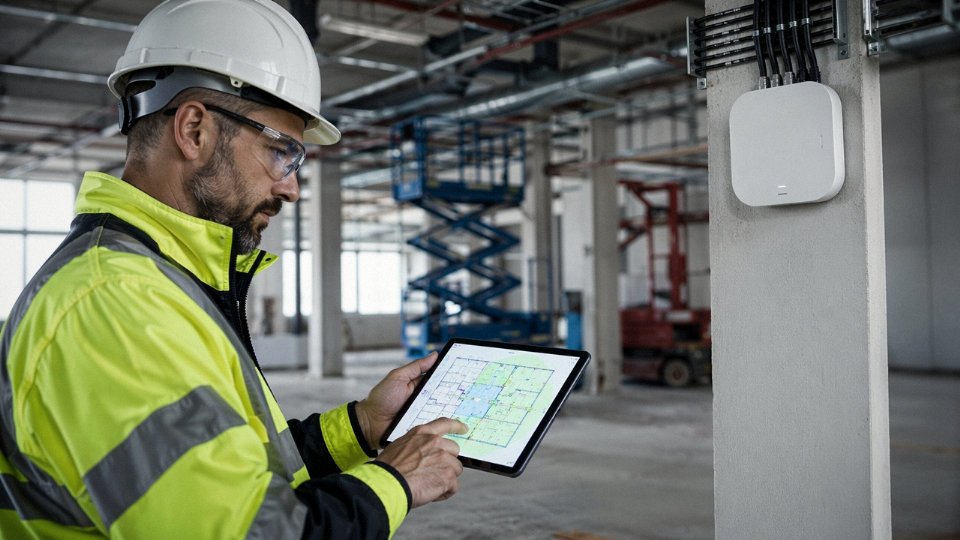
Start with predictive RF modeling before a single cable gets specified. Tools like Ekahau AI Pro and iBwave let you import architectural floor plans, assign wall materials and their attenuation values, and simulate AP placement against actual coverage thresholds. This is not optional on any project above, say, 10,000 square feet — the cost of a software license is trivial against the cost of a poorly placed AP that forces a re-drop later.
Typical density targets depend heavily on use type. Open office and general commercial spaces usually land around one AP per 1,500–2,500 sq ft, assuming standard ceiling heights and mixed device loads. High-density environments — lecture halls, warehouse picking floors with handheld scanners, manufacturing cells with dozens of IoT nodes — compress that to one AP per 800–1,200 sq ft, sometimes tighter. Every AP location on the model becomes a cable drop. That’s the direct link between RF planning and your cabling bill of materials.
Step 2 — Backbone Cabling Architecture
Wire everything in a physical star from the IDF or MDF to each AP location. No daisy-chaining, no consolidation points unless the total channel stays within limits. For standard commercial spaces, Cat 6A U/UTP is the right specification — it handles 10 Gbps at up to 100 m and the unshielded construction is easier to terminate in bulk. In industrial environments with significant EMI — motor drives, induction heating, variable-frequency drives nearby — step up to Cat 6A F/UTP or S/FTP. The foil screen makes a real difference when you’ve got a 75 kW drive running three meters from your cable tray.
Maximum channel length is 100 m including all patch cords, per TIA-568 and ISO/IEC 11801. That means your permanent link (jack to jack, wall plate to patch panel) needs to stay under roughly 90 m to leave room for the patch cords on each end. Measure your actual cable routes, not the floor plan straight-line distances — cable follows pathways, not diagonals.
Cat 6A structured cabling supports 10 Gbps at distances up to 100 meters with insertion loss not exceeding 20.9 dB at 500 MHz per TIA-568-C.2True
This is a defined TIA-568-C.2 channel performance specification for Cat 6A, and the 10GBASE-T standard (IEEE 802.3an) confirms operation over Cat 6A to 100 m.
Step 3 — Switch and PoE Budget Planning
Every WiFi 6E AP draws roughly 20–25 W over PoE. Multiply by the number of ports you’re actively loading, add your other PoE devices (IP cameras, door controllers, whatever else shares the switch), and size the switch’s PoE power budget with 20–25% headroom above that calculated load. A 48-port switch feeding 48 APs at 25 W each needs at least 1,500 W of PoE budget on paper — though in practice you’ll rarely hit all ports simultaneously at full draw. Still, don’t spec a switch rated at exactly the calculated load. Thermal derating at elevated ambient temperatures is real, and a switch that’s perpetually at 95% PoE capacity runs hot and shortens its own lifespan.
Step 4 — Conduit and Pathway Planning
In industrial construction, run Cat 6A in EMT conduit. It protects the cable from physical damage, makes future pulls straightforward, and it’s code-compliant. Commercial plenum spaces can use J-hooks or cable tray, which is faster to install and cheaper per linear foot.
Two details people frequently get wrong: bend radius and power separation. Cat 6A minimum bend radius is four times the cable’s outer diameter — for a typical 6.5–7 mm OD cable, that’s about 26–28 mm. Kinking cable at a corner is one of the most common causes of near-end crosstalk failures that show up during certification. Separation from power conduit matters too. Unshielded Cat 6A needs at least 2 inches of separation from power wiring; shielded Cat 6A (F/UTP, S/FTP) can run adjacent with zero separation per NEC Article 800, which is one practical reason to specify shielded cable in congested industrial raceways even outside high-EMI zones.
Step 5 — Testing and Certification
Every link gets tested to TIA-568 Cat 6A channel or permanent link limits using a Level IV field tester — a Fluke DSX-8000 is the industry reference, though alternatives from Ideal or EXFO are acceptable provided they carry Level IV accuracy certification. All ten parameters must pass: insertion loss, NEXT, FEXT, ELFEXT, return loss, propagation delay, delay skew, and the others. A “mostly passing” test report is not an acceptance document. Contractors who push back on full certification are usually protecting themselves from marginal workmanship.
Keep the test reports. They’re your baseline for troubleshooting three years later when someone complains about intermittent drops in Bay 4.
Step 6 — Documentation and Future-Proofing
Label every cable at both ends with machine-readable tags — thermal-transfer printed, not hand-written. Document everything in a structured cabling management platform so the next team that touches the building isn’t relying on a photocopied floor plan from 2024 with coffee stains on it.
The real future-proofing argument for Cat 6A is this: the physical infrastructure you’re installing today will outlast WiFi 6E by at least two generations. WiFi 7 is already demanding higher backhaul speeds, and Cat 6A can support 25 Gbps and 40 Gbps Ethernet over shorter distances — typically under 30 m for 40GBASE-T — without touching the horizontal cabling. Spend the extra few cents per foot on Cat 6A over Cat 6 now, and the cable plant stays relevant well into the next decade.
Coaxial Cable Specifications Reference: What Jinda Manufactures and How Each Type Relates to WiFi Infrastructure
Understanding which cable type sits in your wall conduit — or buried under your parking lot — matters more than most procurement teams realize until something fails. Here’s a practical breakdown of the coaxial and structured cabling families Jinda produces, with real specification context for each.
RG-6: The Standard CATV and DOCSIS Drop Cable
RG-6 is what most cable installers reach for first, and for good reason. It’s a 75-ohm construction with a solid copper-clad steel (CCS) center conductor, foam polyethylene dielectric, and either dual or quad shielding — quad shield being worth the modest price premium anywhere near industrial interference sources or HVAC equipment. Outer diameter runs 6.9–7.2 mm depending on jacket material and shielding configuration. Attenuation at 1 GHz sits in the 6.5–7.5 dB per 100 feet range, which sounds fine until you add a passive splitter or two and realize you’ve eaten your link budget faster than the installer’s estimate suggested.
In practice, 150 feet from the last passive splitter to the DOCSIS modem is roughly the ceiling for an unamplifed run that still delivers reliable sync. Push past that and you’ll see the modem cycling through partial-service states, especially on DOCSIS 3.1 channels above 900 MHz where attenuation climbs steeply. Quad-shield RG-6 is also the right choice for MoCA 2.5 backhaul, where signal integrity above 1.1 GHz is non-negotiable.
RG-11: For Trunk Runs and Long Exterior Drops
When the run is long — main entrance feeds in multi-dwelling units, outdoor trunk lines across a campus, aerial drops spanning 200+ feet — RG-11 is the sensible answer. The 14 AWG center conductor (versus RG-6’s ~18 AWG effective) cuts attenuation to roughly 3.5–4.5 dB per 100 feet at 1 GHz. OD is 10.3–10.8 mm, so conduit sizing and bend radius both need planning. It won’t fit a standard F-connector tool without adapters, which occasionally surprises field crews who pull the wrong termination kit.
Jinda supplies RG-11 for MDU main trunk applications and long exterior infrastructure runs, where the lower loss margin justifies the heavier cable weight and the slightly higher material cost per meter.
RG-59: Legacy, Declining, and Worth Replacing
RG-59 is still found in older analog CCTV installations and early cable TV infrastructure. Its attenuation above 500 MHz is high enough that it’s genuinely unsuitable for DOCSIS 3.1 or MoCA 2.5 — attempting either is asking for intermittent service and confusing diagnostic calls. New installations should not specify it. In retrofit projects, the practical replacement path for analog CCTV on RG-59 is IP cameras on Cat 6A, which consolidates two cable runs (power and video) into one with PoE and gives you a future-ready backbone rather than a maintenance liability.
RG-59 coaxial cable is suitable for DOCSIS 3.1 broadband serviceFalse
RG-59's higher signal attenuation above 500 MHz makes it incompatible with reliable DOCSIS 3.1 operation, which uses OFDM channels extending to 1.2 GHz. RG-6 or RG-11 is required for modern cable modem service.
Armored Coaxial for Industrial and Outdoor WiFi Infrastructure
Campus outdoor access point runs, direct-burial trunk lines feeding outdoor equipment enclosures, aerial messenger applications in coastal or high-UV environments — these are where standard coax fails prematurely. Jinda’s specialty armored coaxial uses corrugated aluminum or steel armor over standard RG-6 or RG-11 construction, finished with a UV-resistant LLDPE jacket rated for direct burial or lashed aerial deployment. The armor matters most where rodent pressure or mechanical damage risk is real, and the LLDPE jacket outperforms standard PVC in sustained UV exposure by a wide margin — standard PVC jacket begins cracking noticeably in harsh outdoor environments within 5–8 years, sometimes sooner in equatorial or desert climates.
Cat 6A Structured Cable: The Infrastructure Backbone Replacing Coax in New Builds
For any new commercial or industrial WiFi deployment, Cat 6A is where the backbone decision lands. Jinda’s Cat 6A cable uses 23 AWG solid bare copper conductors — not copper-clad aluminum, which is a procurement trap worth watching for in low-bid scenarios. Configuration options include F/UTP (individual pair foil shield) and S/FTP (overall braid plus individual pair foil), the latter being appropriate for environments with significant EMI. Jacket variants cover LSZH for plenum and high-occupancy spaces per IEC 60332-1 flame requirements, and standard PVC where fire rating isn’t mandated.
The cable meets IEC 61156-5 for transmission performance and supports 10 Gbps to 100 meters per TIA-568-C.2, with insertion loss held under 20.9 dB at 500 MHz. That ceiling gives comfortable headroom for a well-terminated structured cabling plant with proper patch panels and quality connectors — don’t let a contractor use Cat 5e keystones at the termination end and expect Cat 6A performance.
Standard supply format is 305 m pull boxes and custom drum lengths for bulk project quantities, which matters for large facility rollouts where per-meter cost and delivery scheduling both need to be controlled. Jinda also supplies matched cable assemblies and can work to custom OEM specifications — conductor count, jacket color coding, print marking, drum length — for international projects where specification conformance and consistent quality across multiple delivery batches is the procurement manager’s actual problem, not just the datasheet.
Real-World Performance Data: WiFi Speed, Latency, and Reliability Across Coax, Ethernet, and Wireless Backhaul
Numbers matter more than theory once you’re specifying infrastructure for a building that has to stay productive for the next fifteen years. The table below summarizes realistic throughput and latency figures across the three main backhaul options — not marketing peaks, but what you should expect under actual operating conditions.
Throughput: What the Physical Layer Actually Delivers
| Backhaul Medium | PHY Rate | Realistic TCP Throughput | Key Conditions |
|---|---|---|---|
| MoCA 2.5 (coax) | 2.5 Gbps | ~1.6–1.9 Gbps | Clean RG-6, splitters minimized, ≤4 nodes |
| Cat 6A Ethernet | 10 Gbps | ~9.2–9.5 Gbps | ≤100 m runs, compliant terminations, shielded in EMI-heavy zones |
| WiFi 6 tri-band mesh (5 GHz backhaul) | 4.8 Gbps theoretical | 800–1,200 Mbps under moderate load | Open office geometry; degrades 30–50% with concrete or metal obstruction |
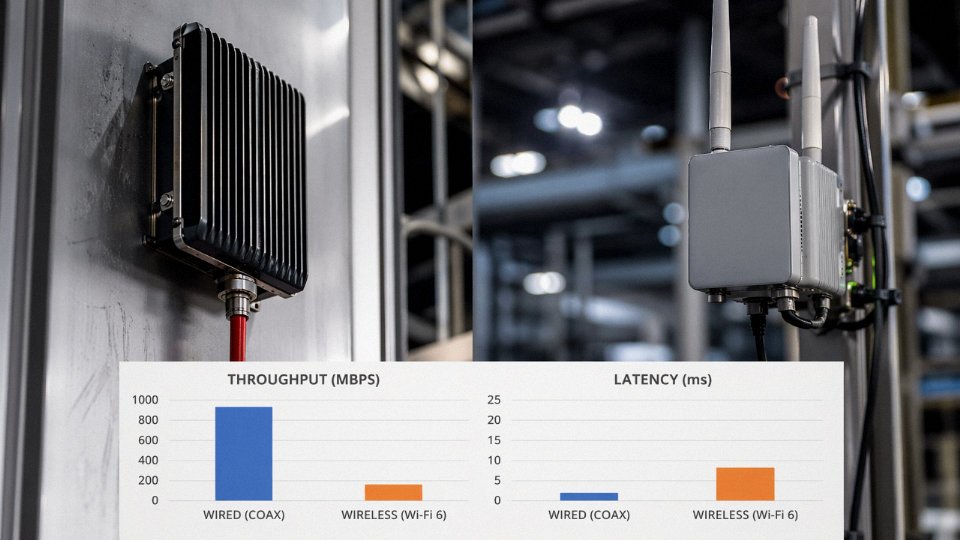
MoCA 2.5 is genuinely capable on existing coax — roughly 1.8 Gbps TCP is achievable, which handles most small-office video and data loads without laying new cable. The gap to Cat 6A is large, though. Under the same 50-meter test run, a certified Cat 6A link with a good switch port will push past 9 Gbps TCP without sweating. Wireless mesh backhaul is the softest number in that table; 800 Mbps is reasonable in a clean environment, but add a second adjacent mesh network, a few microwave ovens, or a mezzanine level with steel grating and you might see 400–600 Mbps on a bad afternoon.
Latency: Where Wired Infrastructure Has a Durable Advantage
Wired Ethernet backhaul from switch to access point adds roughly 0.1–0.3 ms of one-way latency — essentially invisible to any application. MoCA 2.5 sits at approximately 2–4 ms added latency, which is fine for general use but matters if you’re running latency-sensitive machine vision systems or real-time control traffic alongside normal WiFi clients. Wireless mesh adds 2–5 ms per hop; a three-hop mesh path can push 10–15 ms of backhaul latency before the ISP connection is even factored in. 5G fixed wireless access (FWA) runs 10–30 ms to the first external hop depending on tower load and band — adequate for most business applications, not great for anything that requires tight synchronization.
Fiber ISP connections typically add 1–3 ms to the first network hop. That’s baseline overhead you carry regardless of what’s running inside the building.
Reliability and Packet Loss
Cat 6A shielded Ethernet links tested in EMC chamber conditions show packet loss below 0.001%True
Shielded twisted-pair at Cat 6A spec with proper bonding and compliant connectors achieves this in controlled EMC testing; real-world industrial performance depends heavily on correct installation practice and connector quality.
DOCSIS coaxial links are susceptible to ingress noise in the 5–42 MHz upstream band (DOCSIS 3.0 upstream plan) — AM broadcast interference, switching power supplies, and corroded connectors all inject noise into that window. A single loose or corroded F-connector can drop a cable modem from DOCSIS 3.0 to a degraded partial-lock state, which shows up as intermittent packet loss rather than a clean outage. That’s one of the more frustrating faults to chase on a plant floor. Wireless mesh backhaul under high client load typically shows 0.1–1% packet loss — manageable for video streaming, problematic for industrial protocols that expect deterministic delivery.
Why Cable Quality Directly Drives Modem Sync Stability
Substandard coax accounts for a disproportionate share of DOCSIS sync failures in practice. A damaged braid shield, an improperly torqued compression F-connector, or a coil of RG-6 routed past a fluorescent ballast will each inject enough noise to push a modem’s upstream SNR below the threshold for stable QAM-64 or QAM-256 modulation. The modem drops to a lower modulation order, upstream capacity shrinks, and the link becomes unreliable — all without any obvious physical indicator. This is why cable specification and connector quality matter even when coax is just carrying a broadband feed to a single router, not distributing RF internally.
Manufacturing Facility Scenario: 50,000 sq ft, 40 WiFi 6E Access Points
Consider a mid-size production facility — roughly 50,000 sq ft of mixed assembly and warehouse space, deploying 40 WiFi 6E APs to support automated guided vehicles, barcode scanners, and a handful of engineering laptops. Two backhaul architectures go head to head.
All-wireless mesh backhaul: lower upfront cabling labor, but interference incidents average 3–6 per month in a typical industrial RF environment (motor drives, welders, and adjacent 5 GHz networks contribute). Throughput per AP under production-shift load runs 400–700 Mbps. Over five years, factor in repeated troubleshooting calls, two or three AP replacements from heat or vibration, and occasional temporary network outages that idle workers.
Cat 6A Ethernet backhaul to every AP: higher initial cable and installation cost, typically 18–28% more upfront depending on conduit routing complexity. Interference incidents drop to near zero because the backhaul is shielded copper, not airspace. Per-AP throughput under load runs 800–1,100 Mbps consistently. In high-density industrial deployments the five-year TCO for Ethernet backhaul comes out roughly 30–45% lower than all-wireless mesh — the savings come from reduced labor troubleshooting, higher worker productivity during network-dependent tasks, and longer AP service life when backhaul problems stop causing firmware stress cycles.
A Note on Test Documentation
Any vendor supplying structured cable into this kind of deployment should be able to hand over third-party ETL or UL test reports, not just internal datasheets. Request field verification results from a Fluke DSX or equivalent certified tester for installed runs — insertion loss, return loss, NEXT, and PS-ACRF at minimum. Jinda’s production lines operate under a documented QC chain that supports this level of traceability, which matters when a procurement manager needs to demonstrate specification compliance to a systems integrator or end client three years after installation.
Frequently Asked Questions About WiFi, Coaxial Cable, and Choosing the Right Cabling Infrastructure
Does WiFi need a coaxial cable connection to function?
No. WiFi requires an internet source — fiber, DSL, 5G Fixed Wireless Access, or a direct Ethernet hand-off from your ISP — and a router or access point to broadcast the wireless signal. Coax only enters the picture when your ISP delivers service over a DOCSIS cable broadband connection, and even then, the coaxial run terminates at the modem. Nothing downstream of that modem — no laptop, no phone, no access point — needs coax to receive or use WiFi.
WiFi devices connect to a router wirelessly and do not require any coaxial cable connection themselvesTrue
Coaxial cable is an ISP delivery medium for DOCSIS broadband, not a component of the 802.11 wireless protocol. WiFi operates entirely over radio spectrum between devices and the access point or router.
Can I set up WiFi in a room that has no coax outlet?
Yes, and honestly this is the most common retrofit question we see. Pull a Cat 6A Ethernet cable from your router or nearest network switch to a wireless access point mounted in that room — that is the cleanest, highest-performance solution. If running new cable is genuinely impractical (finished ceilings, rental property, historic building), a mesh WiFi node using wireless backhaul works fine for typical residential loads. For anything performance-critical — a conference room, a production cell running IIoT sensors, a warehouse with barcode scanners — spend the time and money on the Ethernet run. Wireless backhaul between mesh nodes introduces latency and cuts available bandwidth, sometimes by half or more depending on the radio band used.
What is MoCA and does it replace coax or use it?
MoCA (Multimedia over Coax Alliance) uses your existing in-building coaxial runs to carry Ethernet-equivalent data at up to 2.5 Gbps per the MoCA 2.5 specification. It leverages coax rather than replacing it. If you already have coax throughout a building and rewiring is cost-prohibitive, MoCA adapters at each end of a coax segment can provide a solid wired backhaul for mesh WiFi nodes without touching a single wall. Throughput is real — 2.5 Gbps is sufficient for most residential and light-commercial applications — but you are still dependent on the condition and topology of the existing coax plant. Old splitters, corroded F-connectors, and sharp-bend damage all degrade MoCA performance in ways that are sometimes hard to diagnose.
Is Cat 6A or coax better for connecting WiFi access points?
For new installations, Cat 6A Ethernet is the right answer in almost every case. It supports 10 Gbps to 100 meters, carries PoE or PoE+ to power the access point without a separate power supply, and interfaces directly with every enterprise-grade AP on the market today. In new construction, the installed cost per drop is typically lower than coaxial infrastructure once you factor in the elimination of separate power runs. Coax via MoCA is a legitimate retrofit option when the coax plant already exists and rewiring would mean significant disruption or expense — it is a pragmatic compromise, not a first-choice specification.
How far can a WiFi access point be from the router using Ethernet cable?
TIA-568 specifies a maximum permanent link length of 90 meters for Cat 5e through Cat 6A, with up to 10 meters of combined patch cord allowance, giving a total channel length of 100 meters (328 feet) at speeds up to 10 Gbps. Exceed that and you either need an intermediate managed switch in a telecom closet or a transition to fiber. In large industrial buildings — a 400-meter-long assembly hall, a multi-story warehouse — fiber backbone between IDF closets is standard practice, with short Cat 6A drops from each closet to the access points in that zone.
Can 5G replace coaxial cable for home internet?
For delivering the ISP connection itself — yes, 5G Fixed Wireless Access can fully replace a DOCSIS coax feed. No coaxial cable required anywhere in the signal path. That said, 5G FWA performance is genuinely location-dependent. A customer 300 meters from a tower with clear line of sight may see consistent 400–800 Mbps. A customer in a dense urban area or 2 km out with obstructions might struggle to break 50 Mbps reliably, especially during peak evening hours. DOCSIS 3.1 cable, where the plant is well-maintained, tends to deliver more consistent throughput across a wider range of conditions. 5G FWA is a real alternative; it is just not universally equivalent.
What cable should I specify for industrial WiFi access point backhaul?
Specify shielded Cat 6A — F/UTP at minimum, S/FTP preferred in environments with significant EMI. Variable frequency drives, servo motors, and large contactors generate broadband electrical noise that can corrupt unshielded data cables running nearby. LSZH jacket is required in plenum spaces and most European installations; in North America, verify local fire code requirements. Run the cable in metallic conduit where mechanical damage or chemical exposure is a risk. In my experience, people underestimate the conduit requirement until they lose a run to a forklift or a solvent spill. Grounding the cable shield properly at one end (shield drain to earth at the switch end, floating at the AP end) is often skipped during installation and causes intermittent noise problems that are genuinely difficult to trace.
Does Jinda supply cables suitable for both coaxial ISP feeds and structured Ethernet WiFi backhaul?
Yes. Jinda manufactures 75-ohm coaxial cables including RG-6 and RG-11 in indoor, outdoor, and armored variants, as well as Cat 6A structured copper cables meeting IEC 61156-5, available with PVC, LSZH, and armored jacket options. Whether a project requires a coaxial feed from an antenna or headend, an Ethernet backhaul network for access points, or both in a hybrid installation, Jinda can supply from a single source — which simplifies procurement, reduces vendor management overhead, and keeps specification consistency across the cable plant.
Procurement and Specification Checklist for International Cable Projects Involving WiFi Infrastructure
Getting the technical design right is only half the job. The other half is making sure what arrives on site actually matches what was specified — and that becomes genuinely complicated on cross-border projects where standards overlap, distributor stock varies, and the pressure to cut unit costs is constant.
Confirm Regional Compliance Standards Before Writing a Single Line Item
North American projects require TIA-568 conformance, UL Listing, and NEC Article 800 jacket ratings. Which jacket rating depends on the installation environment: CMP (plenum) for air-handling spaces, CMR (riser) for vertical runs between floors, CM for general horizontal runs. Specifying CMR where the AHJ actually requires CMP is a code violation that can trigger a full re-pull — expensive, avoidable, and embarrassingly common on fast-track projects.
European projects reference ISO/IEC 11801 and EN 50173, and LSZH (Low Smoke Zero Halogen) jackets are mandatory under IEC 60332 flame classifications in most commercial and public buildings. Middle East and Asia-Pacific authorities often accept IEC 61156 as the base standard, but local AHJ approval can add requirements — fire rating certificates, country-of-origin documentation, sometimes specific third-party lab endorsements. Get this confirmed in writing before procurement, not after the cable clears customs.
Specify Conductor Material Explicitly — and Enforce It
This one matters more than most procurement managers realize. For Cat 6A permanent links, solid bare copper (BC) conductors are non-negotiable. Copper-clad aluminum (CCA) cable fails TIA DC resistance requirements; at the current loads that PoE++ (IEEE 802.3bt, up to roughly 90 W per port) puts through four-pair cable, CCA conductors run measurably hotter and present a documented fire risk. Some CCA product is sold with packaging that looks nearly identical to genuine BC cable. The only reliable check is a conductor cross-section cut and, on larger procurements, an independent DC resistance test against TIA-568 limits.
For coaxial cable, specify copper-clad steel (CCS) center conductor for standard CATV/DOCSIS applications where the signal path is the priority and mechanical strength matters. For MoCA-based whole-home distribution where insertion loss is more critical over longer runs, solid bare copper center conductors measurably reduce attenuation — the difference between RG-6 CCS and RG-6 BC can be 0.5–1 dB per 100 feet at higher frequencies, which compounds across a multi-tap installation.
Copper-clad aluminum (CCA) cable fails TIA-568 DC loop resistance requirements for Cat 6A and poses fire risk under high PoE current loads.True
TIA-568-C.2 specifies a maximum DC resistance of 9.38 Ω/100m for 24 AWG conductors. CCA conductors have higher resistivity than solid copper, causing them to exceed this limit and generate excess heat under sustained PoE current, which independent testing and fire investigation reports have confirmed as a hazard.
Request Third-Party Test Reports, Not Self-Declarations
Ask for ETL Verified, UL Listed, or independent lab reports from SGS, Intertek, or TÜV — actual test reports against the claimed standard, with cable construction details, test dates, and lab accreditation numbers. A supplier who hesitates on this, or who offers only a self-issued conformity certificate, is telling you something important. On a 10,000-drop project, discovering non-conforming cable after installation means re-certification failures, potential re-pulls, and contract penalties that dwarf whatever was saved on unit price. A $0.02/meter saving evaporates fast.
Evaluate Bulk Supply Capability and Lead Times Honestly
For projects exceeding roughly 50,000 meters, confirm that your supplier has either committed production capacity or documented in-stock inventory — not a sales promise. Ask specifically about custom drum and reel packaging options, because site logistics on large installations are genuinely affected by drum size and labeling. Jinda’s five production bases across China, covering 470,000 m² of manufacturing space, support this scale with documented production scheduling and international export experience across more than 50 countries.
Assess Technical Support and Total Cost of Ownership
Verify that the supplier can provide datasheets, installation guidelines, and application engineering input for your specific project conditions — operating temperature range, conduit fill, PoE derating requirements. Language support and responsive technical contacts matter on international projects more than they’re given credit for in procurement evaluations.
Cat 6A infrastructure is typically warranted for 25 years by reputable manufacturers. Factor that service life, plus installation labor cost per drop, plus upgrade path compatibility, into any total cost of ownership comparison against cheaper alternatives. The cable is rarely the largest line item in a structured cabling project — the labor is — which makes field failures disproportionately expensive.
Engineers and procurement managers specifying coaxial feeds, Cat 6A backhaul, or hybrid WiFi architectures for commercial or industrial projects are welcome to contact Jinda directly for product specifications, bulk pricing, and application engineering consultation.